
From a simple prompt to a working software application: exploring autonomous coding agents, full-stack development, browser-based verification, and the future of building software.
Author's note: I'm the developer behind Echo, an autonomous AI software builder. In this article, I'll explain how Echo works, explore the engineering challenges behind AI app builders, and compare its approach with Lovable and Replit. This is a founder's technical perspective, not an independent benchmark.
The way we build software is changing
Imagine describing a software application in plain English and watching an AI system plan its architecture, create its frontend, implement backend services, check the result, and prepare the source code for you to review.
Not just generating a website mockup.
Not just suggesting the next few lines of code.
But coordinating a software development workflow from an initial idea toward an actual working application.
That's the direction autonomous AI app builders are moving.
Platforms such as Lovable, Replit Agent, and Bolt.new have already demonstrated that natural language can become a practical interface for software creation.
Instead of beginning every project by configuring a framework, installing dependencies, creating components, and writing backend routes manually, users can increasingly start with the most important thing:
What do I want to build?
But there's an enormous difference between generating an attractive interface and engineering a reliable application.
A working SaaS product needs more than buttons and pages. It might require authentication, database relationships, permissions, API endpoints, error handling, integrations, and deployment infrastructure.
That's where autonomous software development gets interesting.
And it's the problem that led me to build Echo.
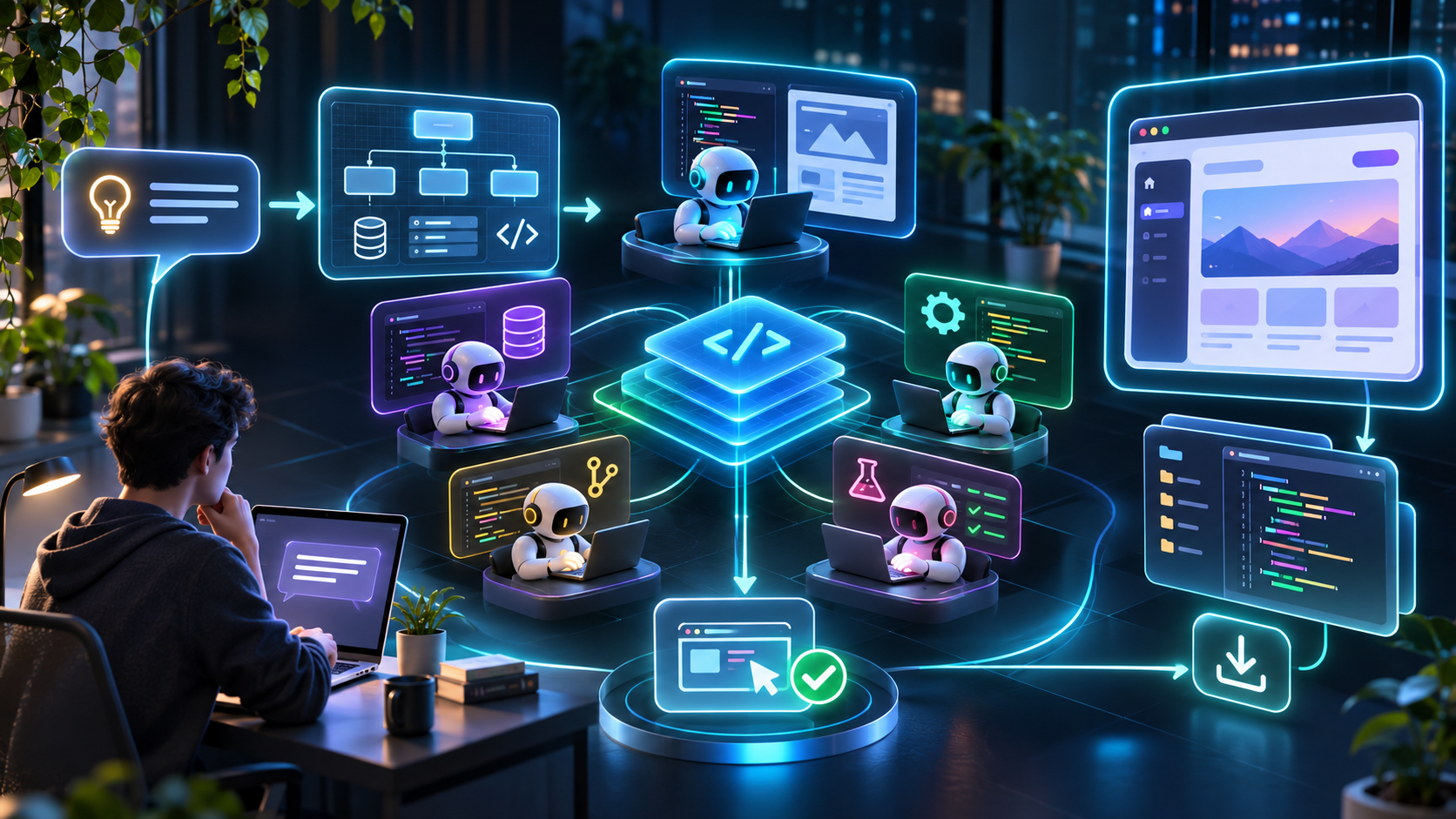
Autonomous AI development brings planning, implementation, and verification into a single workflow.
1. What is an autonomous AI app builder?
An autonomous AI app builder is a software development system that can take a natural-language request and execute multiple steps toward implementing it.
Traditional AI coding assistants primarily help a developer write, understand, or modify code.
Autonomous builders go further by operating on an actual project.
They may create files, install dependencies, run commands, inspect errors, modify implementation details, and test the result.
Consider a prompt such as:
Build a client management application where freelancers can create clients, manage projects, upload deliverables, and track invoice statuses. Include authentication and a responsive dashboard.
A basic code generator might produce a collection of React components.
A more autonomous system attempts to understand the relationships between those components and the rest of the application.
For example:
Which routes does the application need?
What database entities represent clients, projects, and invoices?
Who can view or edit each record?
What happens when an API request fails?
How should authentication interact with protected routes?
Can the project compile and run?
Does the rendered interface behave as expected?
These questions are fundamentally engineering questions.
The goal isn't simply to generate more code. It's to produce a coherent application.
AI code generation vs. autonomous software development Conventional AI code generation Autonomous app-building workflow Generates code in response to a prompt Plans and executes a sequence of development tasks Often works on individual files or snippets Coordinates changes across a project Developer frequently manages the environment Agent may manage dependencies and execution Testing is often a separate manual step Verification can be integrated into the workflow Developer manually connects generated pieces System attempts to deliver an integrated application The distinction isn't absolute. Modern coding assistants and app builders increasingly overlap.
What matters is how much of the complete development process the system can reliably coordinate.
2. Meet Echo: An autonomous AI software builder
Echo is an AI app builder designed around a straightforward idea:
Software creation should be an inspectable engineering process, not an unexplained stream of generated code.
Echo takes an application brief and organizes the work into planning, building, and verification stages.
Its architecture centers on specialist AI agents that operate from a shared technical plan.
Rather than treating the application as one enormous response from a language model, Echo breaks development into responsibilities that can be handled and reviewed separately.
Some of its important capabilities include:
🧠 Plan-first architecture Echo translates a project description into a technical blueprint before implementation.
This includes application routes, data models, and API contracts.
⚡ Parallel multi-agent development Specialist agents work on different parts of the application, such as interface components, state management, server routes, and quality checks.
🔍 Browser-based verification Echo can run technical checks, execute the application in an isolated environment, inspect routes, and render the result in a browser.
🔑 Bring your own AI keys Users can connect supported AI providers and use their own credentials rather than relying exclusively on bundled AI credits.
💻 Source-code ownership Projects can be exported as source code or connected to supported Git providers.
🔄 Reviewable development Plans, code changes, activity history, and verification results give users visibility into the work.
The objective is to make software generation more structured, transparent, and portable.
You can explore the product at echoagent.space or read its feature overview.
3. How Echo actually works: Inside the multi-agent architecture
This is the part that interests me most as a developer.
Generating a useful web application involves multiple dependent decisions.
A frontend component might depend on an API endpoint. That endpoint might depend on a database schema. Authentication might change which records the API is allowed to return.
If those decisions are made independently, the system can produce code that looks plausible but doesn't work together.
Echo's workflow addresses this through a shared plan and coordinated implementation.
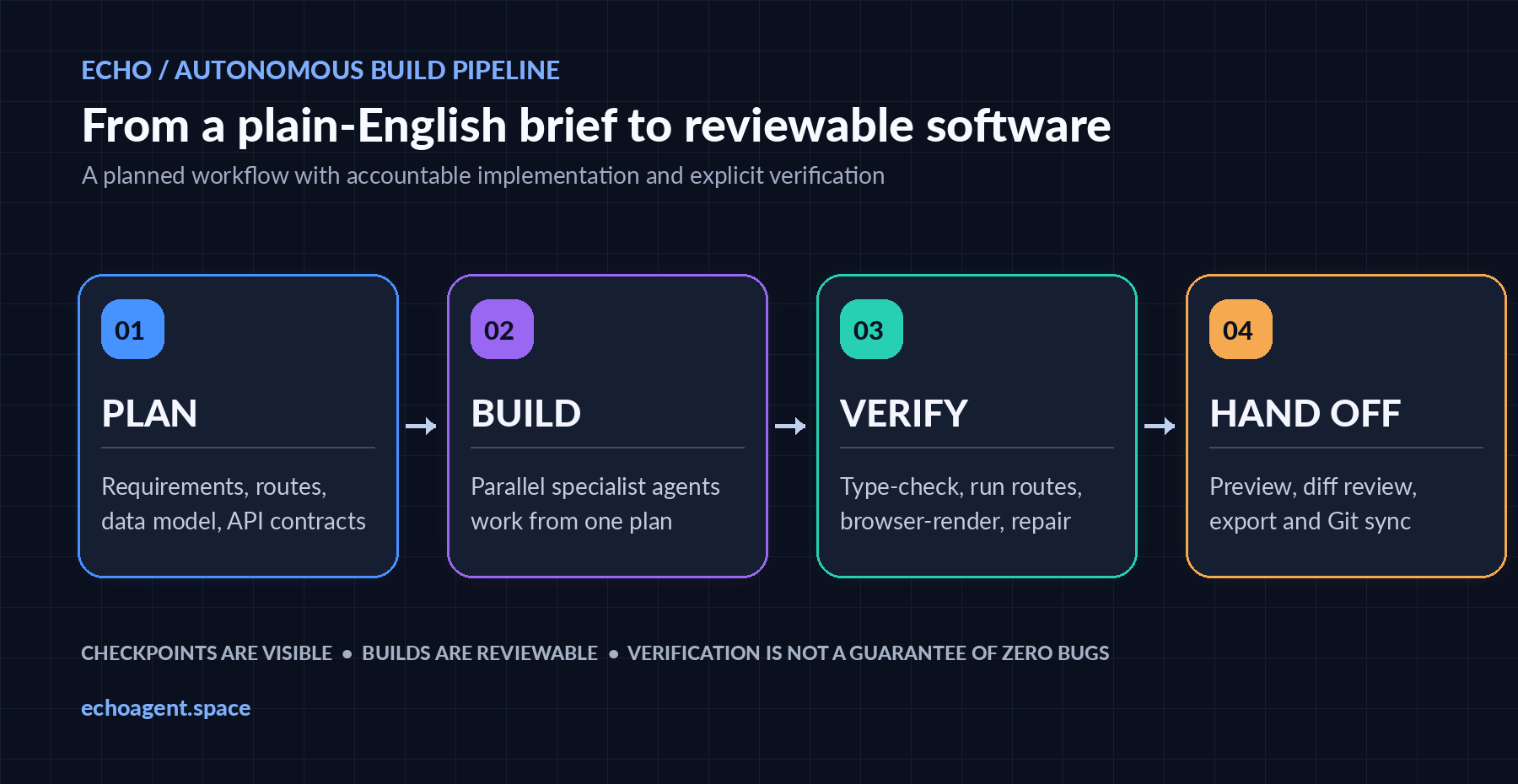
Echo's workflow organizes software development into planning, parallel implementation, verification, and hand-off.
Stage 1: Understand the requirements and generate a plan The first stage is understanding what the user is asking for.
Consider this requirement:
Build a SaaS application where users can create projects, invite teammates, and manage tasks. Each workspace should have its own data.
A useful architecture must resolve several questions:
Application structure
What routes and pages are required? Does the application need a dashboard, workspace settings, project details, and task management views?
Data modeling
How are users related to workspaces? Can a user belong to several workspaces? Does every project belong to exactly one workspace?
Authorization
Can any workspace member invite users? Can members edit projects they didn't create? Who can delete a workspace?
API design
Which endpoints are needed to create projects, retrieve tasks, and update membership information?
Echo's planner is designed to turn requirements into a technical structure that other agents can follow.
The user can review the plan and request changes before proceeding.
This matters because changing an architecture decision before implementation is generally easier than repairing it after numerous components depend on it.
Stage 2: Specialist agents implement the application Once the plan is established, the system can divide implementation into distinct responsibilities.
For example, a multi-agent run might involve:
Frontend responsibilities
Implementing React components, navigation, responsive layouts, forms, loading states, and the visible user experience.
Backend responsibilities
Creating server routes, data access logic, validation, business rules, and integrations.
State and integration responsibilities
Connecting application behavior across components and services.
Verification responsibilities
Checking whether the application compiles, runs, and behaves as expected under supported tests.
Echo's implementation is designed to allow specialist agents to work in parallel on separate parts of the project while sharing the same plan.
This is important because parallel execution without coordination can create conflicting assumptions.
For example, suppose a frontend agent expects a response containing a workspaceId, but the backend agent produces a field named organizationId.
Both implementations might look individually reasonable.
Together, they are inconsistent.
A shared API contract helps reduce that kind of mismatch.
Parallel execution also creates opportunities to reduce elapsed development time, although actual performance depends on the task, model, dependencies, coordination overhead, and available compute.
More agents do not automatically mean a better application. Coordination and verification are what make the architecture useful.
Stage 3: Compile, execute, and verify One of the most challenging aspects of AI-generated software is distinguishing plausible code from working code.
A model can produce code that appears correct but contains missing imports, incompatible dependencies, incorrect types, or runtime failures.
Echo incorporates verification into the build workflow.
Depending on the project and execution stage, this can include:
TypeScript and compilation checks.
Running the application inside an isolated sandbox.
Requesting supported application routes.
Rendering pages with browser automation.
Reporting errors and making repair attempts.
Exposing verification results for review.
This is a meaningful distinction from simply generating files and declaring the task finished.
However, automated verification has limits.
A successful compile does not prove that authorization is secure.
A rendered dashboard does not prove that every database operation is correct.
And a passing browser check does not establish that an application is ready to serve thousands of customers.
Echo's verification process is designed to catch supported classes of defects early, not to replace comprehensive software testing.
Stage 4: Inspect, iterate, and retain the code Once a build is available, users can inspect the result rather than relying solely on an AI-generated summary.
Echo's workspace includes development information such as the plan, activity trail, code changes, preview, and verification status.
A preview can be available while some checks are still pending, so users should pay attention to the reported verification state.
If something needs improvement, they can provide a follow-up instruction.
For example:
Update the dashboard to show overdue tasks separately. Add a confirmation dialog before deleting a project. Do not change the existing authentication flow.
A narrow instruction like this is generally more useful than asking the system to redesign the entire application.
The user can continue refining the result and eventually export the code.
This is an important part of Echo's philosophy: the generated application should remain accessible as ordinary software, not only as something visible inside an AI builder.
Read more about this workflow in How Echo Works.
4. Why bring-your-own-key (BYOK) matters
Most AI software development products have multiple costs associated with them.
But those costs are often grouped together in ways that make comparisons difficult.
There are at least three categories worth understanding:
- AI inference
The language models used to plan, generate, and revise software consume computational resources.
- Development infrastructure
The builder needs an environment to create files, install dependencies, execute builds, test code, and generate previews.
- Application infrastructure
The finished application may require hosting, databases, storage, authentication, email, and third-party services.
These are separate costs, even if a platform bundles some of them into one price.
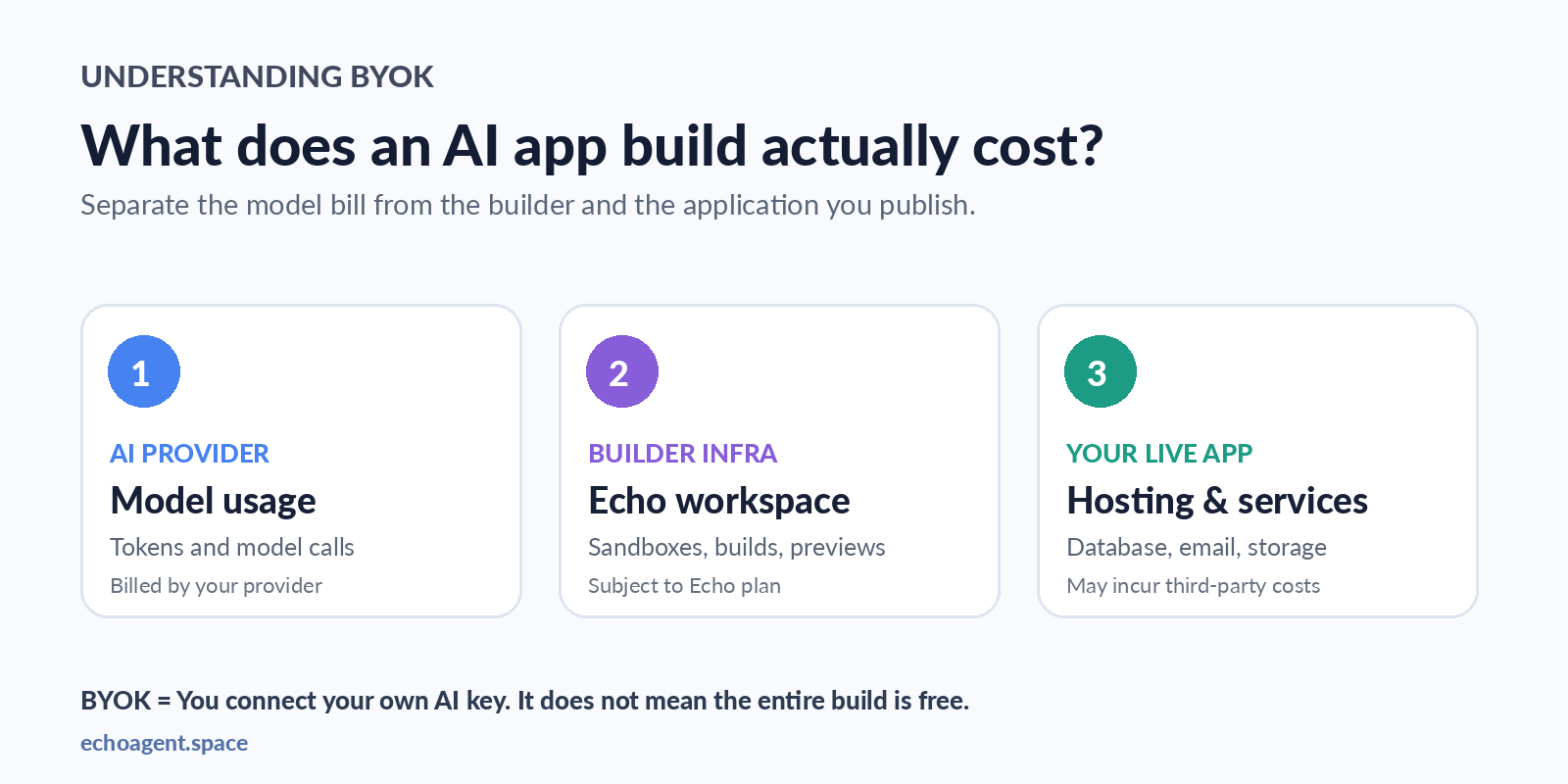
AI provider usage, development infrastructure, and application hosting are separate cost categories.
How BYOK works in Echo Echo supports connecting credentials from AI providers including OpenAI, Anthropic, Google Gemini, Groq, and OpenRouter.
With BYOK, the user chooses a supported provider and supplies the relevant API credentials through the application's settings.
Echo uses the configured provider for supported AI operations.
The AI provider bills the user directly for model usage.
Echo's BYOK model does not add a markup to the provider's token charges.
This gives technically capable users more visibility into the model usage part of their costs.
But there are trade-offs.
Users must manage their own API keys, provider billing, usage limits, and quotas.
A model can become unavailable. A provider may reject a request because of insufficient balance or rate limits. Large builds and repeated repair attempts can consume more tokens than expected.
BYOK is about provider choice and billing transparency. It does not mean unlimited free AI computation.
For users who already maintain AI provider accounts, this may be an attractive approach.
For complete beginners, a fully managed model experience may be more convenient.
That difference is important when deciding which AI app builder to use.
Learn more: Build Apps With Your Own AI API Keys.
5. A practical example: Building a client portal with Echo
Let's explore a realistic application-building scenario.
Suppose a freelancer wants a client portal where customers can view project progress and review deliverables.
Instead of beginning with individual UI components, we start by defining a complete business workflow.
Here is an example prompt:
Build a full-stack client portal for a small creative agency.
The application should have two user roles: administrator and client.
Administrators can create projects, assign clients, upload deliverables, update milestones, and review feedback.
Clients can sign in, view only their assigned projects, inspect deliverables, and approve or request revisions.
Include a responsive dashboard, project details page, milestone timeline, and activity history.
Create a suitable data model and API routes. Enforce access control on the server.
Use a clean, professional visual design.
Do not add invoicing, team chat, or advanced analytics.
Produce a plan first and identify any external services required.
Notice that this prompt does not simply describe how the website should look.
It defines users, permissions, entities, workflows, and exclusions.
Those details are essential for a useful first build.
Step 1 — Create your Echo workspace Visit Echo and create an account.
Start with a small application scope so the first build is easier to inspect.
Step 2 — Connect a supported AI provider Configure your own API key through Echo's provider settings.
Keep the key secret, enable provider spending limits where available, and verify that the selected model is accessible to your account.
Never paste an API key into a public prompt or screenshot.
Step 3 — Submit your requirements Enter the application description.
The planner can organize the requested functionality into routes, data entities, and implementation requirements.
Step 4 — Review the plan Before building, check important assumptions.
For a client portal, verify that the plan includes server-side access control, appropriate data ownership rules, and the distinction between administrator and client permissions.
Step 5 — Run the build Echo's agents implement the planned application using the available execution environment.
The exact result depends on the specification, model, dependencies, and connected services.
Step 6 — Inspect verification results and preview Check which routes load, whether the application compiles, and whether browser verification reports errors.
Then manually test the most important workflow.
For this example, create one admin account and at least two separate client accounts.
Confirm that one client cannot retrieve another client's projects.
Step 7 — Refine and export Request targeted improvements.
For example, add an empty-state message for new projects or improve the milestone review process.
When you're satisfied with the result, export the generated source code or connect it to your preferred supported Git workflow.
This example describes a recommended workflow, not a claim that a specific test run completed successfully. A published case study should include the actual prompt, screenshots, results, and limitations of a real Echo build.
6. Echo vs Lovable vs Replit: How do they compare?
The AI app builder ecosystem is evolving quickly.
Different platforms have different strengths, and the best choice depends on what you're trying to build.
Three useful examples are Echo, Lovable, and Replit Agent.
Lovable: A visual, integrated application-building experience Lovable emphasizes turning ideas into applications through natural-language interaction, visual editing, and integrated cloud infrastructure.
Its documented capabilities include backend services, authentication, payment integration, application previews, code ownership, and GitHub synchronization.
Lovable also provides agent-assisted development and debugging features.
For someone who wants a tightly integrated environment with managed services and a visual editing experience, Lovable is worth evaluating.
An important clarification: Lovable supports source-code ownership and portability. It would be inaccurate to describe Lovable as a platform where users cannot export their code.
Replit Agent: AI development inside a broader programming platform Replit combines a development environment, code editor, project execution, deployment infrastructure, and AI agents.
Replit Agent can plan and implement applications from natural-language instructions.
Its documented functionality includes application testing, Git-based version control, checkpoints, and deployment support.
Replit has also expanded beyond web applications into other kinds of projects and artifacts.
For people who want AI-assisted development alongside a more general-purpose development environment, Replit offers a broad set of capabilities.
Echo: Plan-first, multi-agent development with BYOK Echo places particular emphasis on the workflow that transforms a specification into an application.
Its documented architecture includes plan generation, parallel specialist agents, sandbox-based execution, browser verification, code review, and source-code export.
Echo also offers a BYOK route where users connect supported AI provider credentials and pay the provider directly for model usage.
That model is particularly relevant to developers who want more control over their AI inference costs and provider choice.
Side-by-side comparison Consideration Echo Lovable Replit Agent Core emphasis Structured, multi-agent web app development Integrated visual app creation and cloud workflow Broad AI-assisted development environment Natural-language building Yes Yes Yes Planning Explicit plan-first workflow Supported planning workflows Agent Plan Mode Testing and verification Build checks, sandbox execution, browser verification Preview, debugging, and testing tools Automated application testing and code review options Source-code access ZIP export and Git integrations Code ownership and GitHub sync Git-based version control and GitHub connectivity AI billing emphasis Bring your own provider keys Platform-managed AI workflows Platform-managed Agent usage Particularly relevant for Developers wanting BYOK and a reviewable build pipeline Builders wanting an integrated visual/cloud workflow Builders wanting AI plus a general-purpose development workspace Comparison reflects documented capabilities as of November 2026. This is not a controlled performance benchmark. Product availability, limits, and pricing can change.
Which AI app builder should you choose? Choose Lovable when: An integrated visual development experience and managed application infrastructure are your main priorities.
Choose Replit when: You want a broad development environment that combines AI assistance, execution, editing, and publishing.
Consider Echo when: You want plan-first autonomous development, a specialist-agent workflow, visible verification results, source-code portability, and the option to supply your own AI provider credentials.
There isn't a universally best tool.
A meaningful comparison should test the same requirements across platforms and evaluate the generated application, not only the appearance of the first preview.
7. What kinds of applications can you build with Echo?
Echo is designed for web application development, including projects that require frontend and backend logic.
Some useful categories to explore include:
🚀 SaaS MVPs Founders can use an AI app builder to prototype products involving accounts, workspaces, dashboards, and subscription workflows.
The important step is specifying the smallest complete user journey.
A functioning MVP is more valuable than a large collection of disconnected features.
📊 Internal business tools Teams frequently need relatively specialized software that doesn't justify commissioning a large development project.
Examples include inventory dashboards, approval systems, operations trackers, and reporting interfaces.
👥 Client portals Agencies can prototype systems for project milestones, deliverable reviews, customer requests, and client communication.
These applications require careful permission models and data separation.
🛠 Administrative dashboards Developers can create management interfaces for application data, workflows, settings, and operational reports.
🌐 Marketing websites and custom web interfaces AI-assisted development can also accelerate website creation, especially when a project requires interactive behavior or custom functionality.
However, a static website and a full-stack business application have different engineering requirements.
The complexity of the brief should influence the expected cost, model choice, and testing approach.
Explore more examples on Echo's Use Cases page.
8. Why code ownership matters
One of the most important questions to ask before adopting an AI app builder is:
What happens to my application if I stop using the builder?
The answer should consider several different assets.
Source code: Can I access and modify the actual project?
Database: Can I export and migrate the application data?
Infrastructure: Can I run the application on a different hosting provider?
Dependencies: Does the project depend on services that I would need to replace?
Credentials: Can I manage my own integrations and secrets?
Echo supports exporting source code and connecting projects to supported Git services.
Its generated application workflow uses conventional web technologies rather than requiring an entirely proprietary application runtime.
That creates opportunities for developers to continue working outside the builder.
But portability should still be tested.
Exporting a ZIP file is not automatically equivalent to migrating a complete production system.
Databases, authentication providers, storage services, environment variables, and deployment configurations may require additional work.
And Echo isn't alone in supporting portability: Lovable and Replit also document code ownership or Git-based workflows.
The best approach is to inspect and run an exported project yourself.
9. How much does Echo cost?
At the time of writing, Echo's launch configuration includes a limited free BYOK trial and a paid infrastructure plan.
Free trial The configured launch trial allows five successfully completed build prompts using your own AI provider credentials.
AI provider usage may still incur charges.
The trial is intended to help you evaluate the workflow before paying for Echo's infrastructure plan.
Echo Infra Echo Infra is listed at $15 per month with monthly billing.
It is designed for users who want to continue building with their own AI keys while using Echo's workspace, execution infrastructure, previews, and related development features.
Usage remains subject to infrastructure protections and applicable service limits.
Managed-AI credit plans have been advertised separately and may not yet be available during the launch phase.
Check the current Echo pricing page before subscribing, since availability and prices can change.
A useful way to evaluate any AI app builder is to calculate the cost of a successful outcome.
Instead of asking only how much a prompt costs, ask:
How much provider usage did the build consume?
How many repair attempts were required?
How much work remained after the generated application was ready?
Can the finished application be maintained outside the platform?
A lower nominal cost doesn't necessarily mean better value if the result requires extensive manual repair.
10. Can autonomous AI agents build production-ready software?
This is one of the most important questions in the entire discussion.
Autonomous coding agents are becoming more capable, but production readiness is not a binary property guaranteed by a successful generation.
A useful application can still contain vulnerabilities, inaccessible interfaces, inefficient database queries, data-loss risks, and incorrect business logic.
Before shipping an AI-generated application to real customers, I would check the following.
🔐 Security Review authentication, authorization, server-side validation, exposed secrets, dependency vulnerabilities, and data isolation.
🧪 Functional correctness Test complete user journeys, not just individual pages.
Make sure forms, persistence, error states, and permission checks behave as intended.
⚙️ Reliability Test unexpected inputs, external API failures, rate limits, interrupted operations, and recovery behavior.
♿ Accessibility Verify keyboard navigation, labels, contrast, semantic structure, and important screen-reader interactions.
📈 Performance Measure real loading behavior and profile expensive backend operations.
💾 Data durability Check backups, migrations, and recovery requirements when an application stores customer data.
Browser-based verification and automated repair are useful parts of this process.
They are not replacements for engineering review, security testing, or production monitoring.
That distinction matters for every AI app builder, including Echo.
11. The bigger picture: Why autonomous software development matters
The most interesting consequence of AI app builders isn't simply that software can be generated faster.
It's that the interface between an idea and its implementation is changing.
Historically, translating an idea into a working application required coordinating several kinds of expertise.
Product requirements had to become architecture. Architecture had to become code. Code had to be tested, deployed, monitored, and maintained.
Autonomous agents are beginning to operate across more of these boundaries.
This changes the role of the human developer.
Instead of manually implementing every small step, developers can spend more time defining constraints, reviewing architectural decisions, testing assumptions, and evaluating the result.
But it also creates new engineering challenges.
How do you coordinate agents without introducing conflicts?
How do you keep generated code consistent with a plan?
How do you prevent errors from cascading through multiple tasks?
How do you verify an application when the code was generated by a system that can also generate its own tests?
And how do you make the entire process observable, reproducible, and cost-effective?
These are difficult problems.
They're also the kinds of problems that make autonomous software development a fascinating area to work in.
For me, that's what makes building Echo interesting.
The challenge isn't to make an AI write another React component.
It's to build a reliable system around the AI that can plan, implement, inspect, and revise real software.
12. Frequently asked questions
Can AI build a complete full-stack web application? AI app builders can generate frontend and backend code, implement supported integrations, and help assemble functional applications.
The result still depends on requirements, tooling, models, and verification. Complex production systems require additional testing and review.
Is Echo an alternative to Lovable and Replit? Yes. Echo operates in the same broad category of natural-language AI app development tools.
Its specific emphasis is plan-first autonomous development, coordinated specialist agents, verification, BYOK, and source-code portability.
Does Echo require programming knowledge? Users can describe projects in natural language.
However, knowledge of APIs, application architecture, security, and deployment can be useful when reviewing plans and validating more complex results. BYOK setup also requires an AI provider account and API credentials.
Can I use my own OpenAI, Anthropic, or Gemini API key? Echo documents support for credentials from several AI providers, including OpenAI, Anthropic, Google Gemini, Groq, and OpenRouter.
Actual model availability depends on the provider, account, and current integration support.
Do I own the source code generated by Echo? Echo supports source-code export and Git integrations.
You can inspect and continue working with the generated project. As with any software, third-party dependency licenses and external service requirements still apply.
Is BYOK cheaper than managed AI credits? Not necessarily.
BYOK provides more direct control over model usage and provider billing. Total cost depends on model rates, token consumption, task complexity, retries, builder fees, and infrastructure.
Compare actual completed tasks rather than relying on pricing labels alone.
Does Echo automatically make every application production-ready? No. Automated build and browser checks help identify supported technical problems, but applications still need human review and appropriate security, functional, performance, and operational testing before production use.
Can Echo build SaaS products? Echo is designed to support SaaS-style web application workflows, including frontend/backend development and integration with external services.
For the best results, start with a clearly scoped MVP and verify authentication, permissions, persistence, and payments individually.
Final thoughts: From generating code to engineering software
AI app builders are changing how developers, founders, and teams approach software creation.
Lovable demonstrates the appeal of integrated visual application development.
Replit Agent brings autonomous development into a broad programming environment.
And Echo explores a workflow built around explicit planning, specialist agents, verification, and provider choice.
I built Echo because I wanted to explore what happens when software development is treated as a coordinated agent workflow rather than simply a conversation that generates code.
The result is an AI software builder designed to help turn a plain-English idea into a planned, reviewable, and exportable web application.
It's still important to evaluate the result critically, understand the costs, and test what you build.
But the possibilities are genuinely exciting.
If you're a developer, indie hacker, freelancer, or founder experimenting with AI-powered development, I'd love for you to try it and share what works—and what doesn't.
🚀 Explore Echo Try Echo — Autonomous AI App Builder
See How Echo Works
Explore Echo's Features
See Pricing and BYOK Options
And if you're already using an AI app builder, I'd love to hear your perspective:
What's the hardest part of turning an AI-generated prototype into software you can actually ship?
Sources and further reading
Echo — Official Website
Echo — How It Works
Echo — Features
Echo — BYOK AI App Builder
Lovable — Deployment, Hosting, and Ownership Documentation
Replit — Agent Documentation
Replit — Version Control Documentation
Disclosure: This article is written from the perspective of Echo's developer. The product descriptions are based on documented capabilities and implementation review as of November 2026; no independent comparative performance benchmark is implied.